What does your desktop look like?

Started by juliana_phang · 3 Jun 2003 · 2,835 replies

General Discussion Page 85 of 142

9 Dec 2006, 12:44 #1681
bmwracer wrote:
You need to upload your image to an imagehost like Photobucket or Imageshack, then post the image with the [img] [/img ] tags.


yeah what bmw said
9 Dec 2006, 12:53 #1682
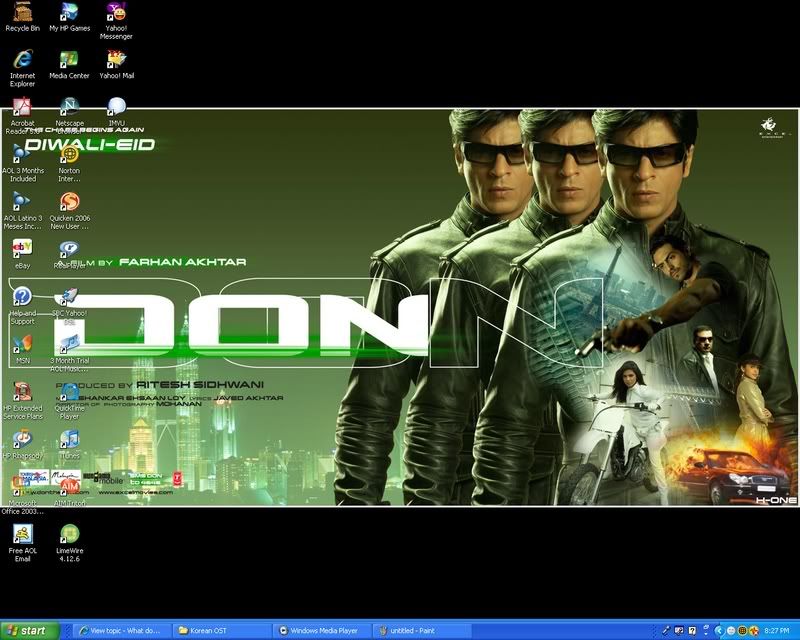
[image]


Finally got it on here, Arigato for all help! :victory: :woot: :woot:
9 Dec 2006, 13:00 #1683
Raining JHan wrote:[image]


Finally got it on here, Arigato for all help! :victory: :woot: :woot:


lol, awesome. glad to be of help =)
9 Dec 2006, 16:26 #1684
Raining JHan wrote:[image]


Finally got it on here, Arigato for all help! :victory: :woot: :woot:


thats my hero..Shah Rukh Khan! :dancing: :dancing: Last night I'm watching again Devdas and see how handsome he is! Really melted my heart :smitten:
10 Dec 2006, 03:32 #1685
Yup, he is really good actor, best Indian actor to date!
10 Dec 2006, 04:05 #1686
There's a Bollywood thread. :)

I need to change my desktop image, but I can't find a decent image of Nagase Tomoya. :puppydog:
10 Dec 2006, 07:21 #1687
So can anyone tell me how to get the desktop image from my Mac?
10 Dec 2006, 08:53 #1689
Eve wrote:So can anyone tell me how to get the desktop image from my Mac?


You don't have the image located somewhere else on your compy? Or is this a default graphic that comes wtih a Mac?
10 Dec 2006, 09:27 #1690
[image]
Fave color+fave actress=fave desktop
10 Dec 2006, 10:46 #1691
Dega Kima wrote:[image]
Fave color+fave actress=fave desktop


nice looking desktop
10 Dec 2006, 10:47 #1692
Raining JHan wrote:[image]


My Bi-Rain Desktop!!! :victory:


:woot: looks good haha
10 Dec 2006, 11:39 #1693
Wynter wrote:

You don't have the image located somewhere else on your compy? Or is this a default graphic that comes wtih a Mac?


Sure I do but then it doesnt post as the desktop just as a pic. :puppydog:
10 Dec 2006, 11:43 · edited #1694
I don't know if anyone posted this yet but here goes.

All you have to do is click the 'PrtScrn' key and whatever is on your monitor at that moment will be in your clipboard. then simply save your clipboard to a jpeg and then you can upload it to a photo site.

So if you have your desktop on the monitor click on the key and voila it's in your clipboard.

:dancing: :dancing: :dancing:

oops. I see it's already been described. Well then for any newcomers who have not seen the description.
:bonk:
10 Dec 2006, 11:50 #1695
ralphm1999 wrote:I don't know if anyone posted this yet but here goes.

All you have to do is click the 'PrtScrn' key and whatever is on your monitor at that moment will be in your clipboard. then simply save your clipboard to a jpeg and then you can upload it to a photo site.

So if you have your desktop on the monitor click on the key and voila it's in your clipboard.

:dancing: :dancing: :dancing:


Yeah that is right, i had hard time at first too, but uh huh, just do what Ralphm1999 has said ok!
10 Dec 2006, 14:14 #1696
Dega Kima wrote:[image]
Fave color+fave actress=fave desktop


wow, Nice one. :applaud:
12 Dec 2006, 12:44 #1698
a-nesuto wrote:made a change
[image]


nice looking desktop! :woot:
12 Dec 2006, 15:20 #1699
a-nesuto wrote:made a change
[image]


Girl is cute! :love_eyes: love back ground color as well!

Replying needs an account. Registration opens soon.