Making Animated GIFs

Started by KouSeiya315 · 18 Feb 2004 · 178 replies

General Discussion Page 8 of 9

22 Aug 2005, 02:45 #141
supermidget wrote:If someone already mentioned that you can also use Macromedia Flash (4) to make Animated Gifs, please forget this post...

I always use flash, it is very easy to use. It cannot import avi's (as most programs cannot do that).. you need Virtual Dub to create an BMP sequence of the frames you want, then import them in flash. You can easily resize the frames and export it *if you know where to find the buttons*.

I don't know about the price, but i'm sure you can find some way to get it for free... ;)


i want to learn how to use it, so i can make my own gif's, but it seems confusing... what do you all recommend as for a free program i can get online... :bonk:
22 Aug 2005, 11:32 #142
qilver wrote:what do you all recommend as for a free program i can get online... :bonk:

Don't know if there's such a thing... You might have to Google it.
22 Aug 2005, 12:03 #143
bmwracer wrote:
Don't know if there's such a thing... You might have to Google it.


I did that already and most of them are just free trials, mostly 30-days :sweat:

If you use limewire....you can try to get Photoshop CS or Ulead or any gif programs. Takes a long time though :nut:
23 Aug 2005, 01:34 #144
K.T.Tran wrote:

I did that already and most of them are just free trials, mostly 30-days :sweat:

If you use limewire....you can try to get Photoshop CS or Ulead or any gif programs. Takes a long time though :nut:


@KT, thanks to you, i now can do screen caps off CM's, but now i gotta figure out how to do gif's off CM's and movie/dramas..... :sweat:
23 Aug 2005, 02:06 #145
qilver wrote:

@KT, thanks to you, i now can do screen caps off CM's, but now i gotta figure out how to do gif's off CM's and movie/dramas..... :sweat:


No problem at all qilver :mrgreen:

Do you remember my Aya gif where she opens here mouth really big???
She actually said "A girl" :hehe: That was from a CM. I just took many screen caps. Pause at the spot i wanted and took a cap. Kept doing that.
I'm sure you'll get it. Ganbatte qilver-san :victory:
23 Aug 2005, 03:06 #146
K.T.Tran wrote:

No problem at all qilver :mrgreen:

Do you remember my Aya gif where she opens here mouth really big???
She actually said "A girl" :hehe: That was from a CM. I just took many screen caps. Pause at the spot i wanted and took a cap. Kept doing that.
I'm sure you'll get it. Ganbatte qilver-san :victory:


looking forward to seeing your new sig, of aya. :thumbsup:
23 Aug 2005, 03:55 #147
qilver wrote:

looking forward to seeing your new sig, of aya. :thumbsup:


Here my new Aya gif. Part of her Message PV :woot:
I actually made one of her singing :woot: :dancing: :victory:
Smaller then the Hello Gif, but not sure if i want to put another Gif in my sig....might be too much :sweat:
23 Aug 2005, 03:59 #148
you can only put 3 Sigs in your Sig.
23 Aug 2005, 04:03 #149
SubaruWRX wrote:you can only put 3 Sigs in your Sig.


Last time i tried to go for 3....it said my Sig is too big :beaten:

I think its because I link my sig gif to the Vote for Aya page :mrgreen:

All good though. I stick with One Gif and one pic of Aya for awhile :victory:
23 Aug 2005, 05:04 #150
SubaruWRX wrote:you can only put 3 Sigs in your Sig.


really? so it is not by the size limits, like four smaller sigs.
can also put one pix, two sigs, or two pix one sig, or three pix in the sig.
maybe diff. combos.
23 Aug 2005, 05:43 · edited #151
supermidget wrote:If someone already mentioned that you can also use Macromedia Flash (4) to make Animated Gifs, please forget this post...

I always use flash, it is very easy to use. It cannot import avi's (as most programs cannot do that).. you need Virtual Dub to create an BMP sequence of the frames you want, then import them in flash. You can easily resize the frames and export it *if you know where to find the buttons*.

I don't know about the price, but i'm sure you can find some way to get it for free... ;)
i use flash too for making gifs, and thats what i told arnel ;) though i stopped putting out gif images here cuz some peeps still have dial-up.
23 Aug 2005, 07:51 #152
K.T.Tran wrote:Last time i tried to go for 3....it said my Sig is too big :beaten:

That's 'cause you're limited to 255 total characters in the sig box. ;)
23 Aug 2005, 20:37 #153
bmwracer wrote:
That's 'cause you're limited to 255 total characters in the sig box. ;)


I see. No wonder.
Wasn't able to have the link in if I wanted 3 gifs or 2 gifs and 1 pic. guess i can't alwas have it my way :puppydog:
23 Aug 2005, 21:55 #154
K.T.Tran wrote:guess i can't alwas have it my way :puppydog:

Yup.

This site ain't Burger King. :hehe:
24 Aug 2005, 03:04 #155
New Sig, a replay of a Run I did in GT4.
4 Sep 2005, 19:54 #156
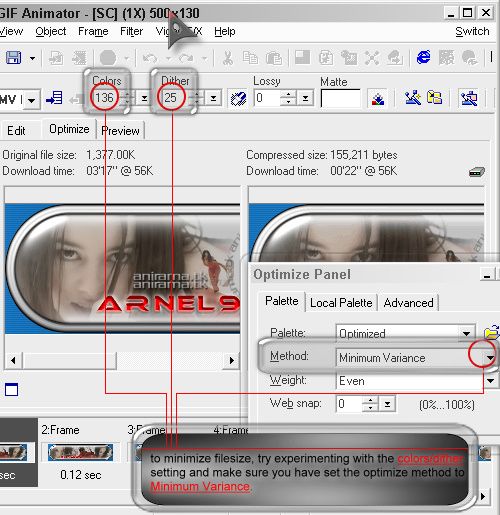
since the new ava+sig limit is now reduced to 200kb total, here's a tip on how to minimize the filesize of ur gifs.
[image]
If you still cant make it fit 200kb, then you have to either:
drop several frames
reduce dimensions (height, width or both)[/list:u]hope this helps...

Another thing, if you have multiple gifs or a gif with a big dimension, it's gonna impact cpu and browser performance.
To see if your gif is causing system slow down, try viewing your post with all your gifs viewable in the browser.
Then, open up task manager and go to the CPU tab.
If it always show 100% utilization, that means that your gif is using up all CPU resources and SLOWS DOWN performance for everyone - doesnt matter if they're on dial-up or broadband.
To remedy this, make sure to reduce the speed of your gif (frames per second) and also make sure that they dont have the same fps.
For example, on mine, since I have both animated ava and sig, I set a different frames per second between the ava and sig, usually around 12/100 (8fps) for the sig and 15/100 (6fps) for the ava, so it doesnt use up as much CPU resources...
4 Sep 2007, 08:14 #157
pearl jam wrote:I guess in this thread this is not off topic...

bmwracer, I wanted to ask you about the animated avatar you had a couple weeks back. I tried to make one, and when I view the version on my harddisk, it works, but the uploaded one is just stuck. Any advice?

What program did you use to create the animated gif?

Did you save it with the .gif extension?
4 Sep 2007, 08:17 #158
Ha. Well, I never even considered that there might be a whole thread for this topic! :bonk:

I used Adobe ImageReady. I haven't really used it before, I usually only need the functions in Photoshop.

***EDIT***

Yes, it has a .gif extension
4 Sep 2007, 08:20 #159
pearl jam wrote:Ha. Well, I never even considered that there might be a whole thread for this topic! :bonk:

Now you know... ;)

I used Adobe ImageReady. I haven't really used it before, I usually only need the functions in Photoshop.

Ah, so do I...

Uh, if the .gif works on your PC, that means it's okay... :headscratch:

Um, where are you hosting the .gif image? Does the image host allow hotlinking?

Can you post the .gif so I can look at it? :)
4 Sep 2007, 08:26 #160
I'm hosting it at my Geocities with my Yahoo! account.

Here's a link to the file

http://www.geocities.com/inmytree1996/koyukianimeavatar01a.gif

It's not animated when I view it there either.

Replying needs an account. Registration opens soon.